 12b2b71106 The README grew as a list of per-change notes. Reorder it along the operator's path (install, first login, compute node, configuration, update, usage, development) and correct what no longer matched the code: supported distros and Python, the openSUSE nginx step that installed a full nginx.conf as a vhost, the disabled serial console listed as a feature, missing ALLOWED_HOSTS and file-mode steps, services not restarted, and an update path that copied settings blocks by hand instead of rebuilding settings.py from the template with the panel stopped. |
||
|---|---|---|
| .github | ||
| accounts | ||
| admin | ||
| appsettings | ||
| computes | ||
| conf | ||
| console | ||
| datasource | ||
| dev | ||
| doc | ||
| instances | ||
| interfaces | ||
| locale | ||
| logs | ||
| networks | ||
| nwfilters | ||
| static | ||
| storages | ||
| templates | ||
| virtsecrets | ||
| vrtManager | ||
| webvirtcloud | ||
| .dockerignore | ||
| .gitignore | ||
| .gitpod.yml | ||
| .hadolint.yaml | ||
| _config.yml | ||
| docker-compose.yml | ||
| Dockerfile | ||
| gunicorn.conf.py | ||
| install.sh | ||
| manage.py | ||
| pyproject.toml | ||
| README.md | ||
| Vagrantfile | ||
| webvirtcloud.sh | ||

WebVirtCloud
Python >=3.10 & Django 5.2 LTS (tested on Python 3.10 – 3.13)
WebVirtCloud is a web visualization and management layer for libvirt-based virtualization infrastructure.
libvirt is the single source of truth. WebVirtCloud reads, displays and triggers actions on libvirt state, but it is never the primary orchestrator.
- An administrator can connect to libvirt directly with
virt-managerorvirshand create, delete, rename or reconfigure virtual machines. WebVirtCloud detects these changes and updates its database accordingly. - Virtual machines keep running even when WebVirtCloud is stopped; the application only reflects the current state of libvirt.
- WebVirtCloud is not a full automation platform like Proxmox. Its goal is to expose libvirt's functionality through the browser in an accessible, role-based and secure way.
┌─────────────────────────────────────────────────────┐
│               Administrator / User                  │
└────────────┬───────────────────┬────────────────────┘
             │ Web browser        │ virt-manager / virsh
             ▼                   ▼
┌────────────────────┐  ┌─────────────────────────────┐
│   WebVirtCloud     │  │   libvirt API (direct)      │
│   (web UI layer)   │◄─┤   — separate, independent   │
└────────┬───────────┘  └──────────────┬──────────────┘
         │ libvirt API                  │
         ▼                             ▼
┌──────────────────────────────────────────────────────┐
│               libvirtd (hypervisor daemon)           │
│                    QEMU / KVM                        │
└──────────────────────────────────────────────────────┘
WebVirtCloud and virt-manager/virsh can manage the same libvirt host concurrently and independently. WebVirtCloud picks up external changes the next time the instance list page is loaded.
Features
- QEMU/KVM hypervisor management (multiple compute nodes)
- Virtual machine lifecycle: create, delete, power management, clone, migrate
- External change detection: VMs created, deleted or renamed via
virt-managerorvirshare reconciled into the database automatically - Real-time hypervisor and VM statistics (CPU, RAM, disk, network)
- Storage pool and volume management
- Network and interface management
- Browser-based VNC console (noVNC)
- Role-based access control: users only see the VMs assigned to them
- 2FA (OTP / TOTP) and failed-login lockout
- SSH public key and root password management (via guestfs)
- Cloud-init datasource interface (OpenStack metadata compatible)
- REST API — OpenAPI 3.0 (Swagger & ReDoc)
- LDAP / Active Directory integration (optional)
Contents
- Installation: installer, Docker, manual, first login
- Adding a Compute Node
- Configuration: environment variables, HTTPS and reverse proxy, cloud-init datasource, LDAP
- Updating
- Usage: users and permissions, REST API, screenshots
- Development
Installation
The panel runs on Ubuntu 22.04 / 24.04, Debian 12, RHEL / Rocky Linux / AlmaLinux / Oracle Linux 10, openSUSE Leap 15.x / Tumbleweed and SLES 15, on a virtual machine, a physical host or a KVM host itself. It needs Python 3.10 or newer. Pick one of the three ways below, then do the first login.
Installer
curl -fsSL -O https://raw.githubusercontent.com/retspen/webvirtcloud/master/install.sh
chmod 744 install.sh
sudo ./install.sh
The installer writes the server's names and IPs to ALLOWED_HOSTS. Running it again keeps settings.py, the database, the secret key and the main nginx config, but replaces /etc/nginx/conf.d/webvirtcloud.conf and the supervisor config; back up your own lines in those two (TLS, environment=) first.
Docker
# 1. Clone repository:
git clone https://github.com/retspen/webvirtcloud
cd webvirtcloud

# 2. Set the names/IPs the panel is reached by (git pull never touches this file):
cat > docker-compose.override.yml <<'EOF'
services:
  webvirtcloud:
    environment:
      - ALLOWED_HOSTS=wvc.example.com,192.0.2.10
EOF

# 3. Start services:
docker compose up -d
The panel is at http://<server-ip>, the noVNC console on port 6080. The database and secret key live in the webvirtcloud-data volume, the SSH keys in webvirtcloud-ssh. Other settings go in the same environment: list, see Environment variables.
Manual installation
Run the steps from a root shell (sudo -i). In step 3, replace the example ALLOWED_HOSTS with the names/IPs the panel (and the cloud-init datasource) is reached by.
The virtualenv is created with --system-site-packages: libvirt-python and python-ldap come from the distro packages when their version satisfies conf/requirements.txt; otherwise pip builds them, which needs the -dev/-devel packages listed below. Everything else, including lxml, comes from pip.
Ubuntu 22.04 / 24.04, Debian 12
# 1. System packages
apt-get update && apt-get -y install git python3-venv python3-dev python3-lxml python3-libvirt libvirt-dev zlib1g-dev libxslt1-dev nginx supervisor libsasl2-modules gcc pkg-config python3-guestfs libsasl2-dev libldap2-dev libssl-dev

# 2. Code
git clone https://github.com/retspen/webvirtcloud /srv/webvirtcloud
cd /srv/webvirtcloud

# 3. Settings, allowed hosts and secret key
cp webvirtcloud/settings.py.template webvirtcloud/settings.py
sed -i 's|^ALLOWED_HOSTS = .*|ALLOWED_HOSTS = ["wvc.example.com", "192.0.2.10", "localhost", "127.0.0.1", "[::1]"]|' webvirtcloud/settings.py
mkdir -p data && python3 conf/runit/secret_generator.py > data/secret_key && chmod 600 data/secret_key

# 4. Virtualenv and dependencies
python3 -m venv --system-site-packages venv
source venv/bin/activate
pip install -r conf/requirements.txt

# 5. Database and static files (the first migrate creates the "admin" user)
python3 manage.py migrate
python3 manage.py collectstatic --noinput

# 6. Supervisor (gunicorn and novncd) and nginx
cp conf/supervisor/webvirtcloud.conf /etc/supervisor/conf.d/
cp conf/nginx/webvirtcloud.conf /etc/nginx/conf.d/
rm -f /etc/nginx/sites-enabled/default

# 7. Ownership, private files, start
chown -R www-data:www-data /srv/webvirtcloud
chmod 700 data && chmod 600 webvirtcloud/settings.py db.sqlite3
systemctl restart nginx supervisor
RHEL / Rocky Linux / AlmaLinux / Oracle Linux 10
# 1. System packages
dnf -y install epel-release
dnf -y install git python3-devel libvirt-devel python3-libvirt python3-ldap python3-lxml cyrus-sasl-devel cyrus-sasl-md5 openldap-devel openssl-devel glibc gcc nginx supervisor python3-libguestfs iproute-tc

# 2. Code
git clone https://github.com/retspen/webvirtcloud /srv/webvirtcloud
cd /srv/webvirtcloud

# 3. Settings, allowed hosts and secret key
cp webvirtcloud/settings.py.template webvirtcloud/settings.py
sed -i 's|^ALLOWED_HOSTS = .*|ALLOWED_HOSTS = ["wvc.example.com", "192.0.2.10", "localhost", "127.0.0.1", "[::1]"]|' webvirtcloud/settings.py
mkdir -p data && python3 conf/runit/secret_generator.py > data/secret_key && chmod 600 data/secret_key

# 4. Virtualenv and dependencies
python3 -m venv --system-site-packages venv
source venv/bin/activate
pip install -r conf/requirements.txt

# 5. Database and static files (the first migrate creates the "admin" user)
python3 manage.py migrate
python3 manage.py collectstatic --noinput

# 6. Supervisor (gunicorn and novncd, as nginx) and nginx
sed 's/^user=.*/user=nginx/' conf/supervisor/webvirtcloud.conf > /etc/supervisord.d/webvirtcloud.ini
cp conf/nginx/webvirtcloud.conf /etc/nginx/conf.d/
# make sure the default server block in /etc/nginx/nginx.conf does not also listen on port 80

# 7. Ownership, private files, SELinux, firewall, start
chown -R nginx:nginx /srv/webvirtcloud
chmod 700 data && chmod 600 webvirtcloud/settings.py db.sqlite3
semanage fcontext -a -t httpd_sys_content_t "/srv/webvirtcloud(/.*)" 2>/dev/null || true
restorecon -R /srv/webvirtcloud 2>/dev/null || true
setsebool -P httpd_can_network_connect on 2>/dev/null || true
firewall-cmd --add-service=http --permanent 2>/dev/null || true
firewall-cmd --add-port=6080/tcp --permanent 2>/dev/null || true
firewall-cmd --reload 2>/dev/null || true
systemctl enable nginx supervisord
nginx -t && systemctl restart nginx supervisord
openSUSE Leap 15.x / Tumbleweed, SLES 15
# 1. System packages (Python 3.11 stack)
zypper --non-interactive install -y git hostname python311 python311-base python311-devel python311-pip python311-libvirt-python python311-lxml python311-ldap libvirt-devel cyrus-sasl-devel libopenssl-devel gcc pkg-config nginx
zypper --non-interactive install -y python3-supervisor || zypper --non-interactive install -y supervisor

# 2. Code
git clone https://github.com/retspen/webvirtcloud /srv/webvirtcloud
cd /srv/webvirtcloud

# 3. Settings, allowed hosts and secret key
cp webvirtcloud/settings.py.template webvirtcloud/settings.py
sed -i 's|^ALLOWED_HOSTS = .*|ALLOWED_HOSTS = ["wvc.example.com", "192.0.2.10", "localhost", "127.0.0.1", "[::1]"]|' webvirtcloud/settings.py
mkdir -p data && python3.11 conf/runit/secret_generator.py > data/secret_key && chmod 600 data/secret_key

# 4. Virtualenv and dependencies
python3.11 -m venv --system-site-packages venv
source venv/bin/activate
pip install -r conf/requirements.txt

# 5. Database and static files (the first migrate creates the "admin" user)
python3 manage.py migrate
python3 manage.py collectstatic --noinput

# 6. Supervisor (gunicorn and novncd, as nginx) and nginx
mkdir -p /etc/supervisord.d
sed 's/^user=.*/user=nginx/' conf/supervisor/webvirtcloud.conf > /etc/supervisord.d/webvirtcloud.ini
# make sure /etc/supervisord.conf has: [include] files = /etc/supervisord.d/*.ini
cp conf/nginx/webvirtcloud.conf /etc/nginx/conf.d/

# 7. Ownership, private files, start
chown -R nginx:nginx /srv/webvirtcloud
chmod 700 data && chmod 600 webvirtcloud/settings.py db.sqlite3
systemctl enable nginx supervisord
nginx -t && systemctl restart nginx supervisord
First login
The first migrate creates a superuser named admin with a random password, written to data/admin_password (mode 0600):
sudo cat /srv/webvirtcloud/data/admin_password            # installer or manual installation
docker compose exec webvirtcloud cat data/admin_password   # Docker
Sign in at http://<server-ip>; you must set a new password at the first login, and the file is then deleted. To choose the name or password yourself, set ADMIN_USERNAME and/or ADMIN_PASSWORD in the environment before that first migrate; a password you set is not written to the file and need not be changed. A lost password is reset with python3 manage.py changepassword admin.
Adding a Compute Node
A compute node is a KVM host the panel manages over libvirt.
-
Install KVM and libvirt. The bootstrap script handles Ubuntu, Debian, CentOS, Fedora, openSUSE and SLES; on RHEL, Rocky Linux or AlmaLinux install the
qemu-kvmandlibvirtpackages and enablelibvirtdyourself:curl -fsSL https://raw.githubusercontent.com/retspen/webvirtcloud/master/dev/libvirt-bootstrap.sh | sudo sh # or, from a cloned repository: sudo sh ./dev/libvirt-bootstrap.sh -
On the panel host, give the web service user (
www-dataon Debian/Ubuntu,nginxon RHEL/openSUSE) an SSH key and copy it to the compute node:sudo install -d -m 700 -o www-data -g www-data ~www-data/.ssh sudo -u www-data ssh-keygen -t ed25519 sudo -u www-data tee ~www-data/.ssh/config > /dev/null << 'EOF' Host * StrictHostKeyChecking no EOF sudo chmod 600 ~www-data/.ssh/config sudo -u www-data ssh-copy-id root@<compute-node-ip>In Docker, run the
ssh-keygenandssh-copy-idcommands inside the container instead (docker compose exec --user www-data webvirtcloud ssh-keygen -t ed25519, and the same forssh-copy-id); the keys are kept in thewebvirtcloud-sshvolume. -
Install or update the
gstfsddaemon on the compute node. It sets the root password and SSH key of a shut-off VM:curl -fsSL https://raw.githubusercontent.com/retspen/webvirtcloud/master/conf/daemon/gstfsd | sudo tee /usr/local/bin/gstfsd > /dev/null sudo chmod +x /usr/local/bin/gstfsd sudo systemctl restart supervisor 2>/dev/null || sudo systemctl restart supervisordIt listens on 127.0.0.1:16510 only, which serves a panel on the same host. For a remote panel, uncomment the
environment=GSTFSD_BIND_HOST="0.0.0.0",GSTFSD_ALLOW_REMOTE="1"line of its supervisor program (conf/supervisor/gstfsd.conf) and restart supervisor. It is unauthenticated: allow TCP 16510 only from the panel's IP. -
Add the compute on the panel's Computes page.
Firewall: the compute's VNC ports (5900–65535) must accept connections only from the panel's IP, never from public networks.
For VM migration between computes, define shared storage as a storage pool on every host (a VM migrates only when its disk, backing and ISO files and block devices are volumes of the destination's pools), and where the hosts cannot resolve each other's names, set each compute's Migration address on its edit page.
If libvirt warns Host SMBIOS information is not available, install dmidecode (apt-get, dnf or zypper install -y dmidecode) and restart libvirtd.
Configuration
Environment variables
| Variable | Effect |
|---|---|
ALLOWED_HOSTS |
extra host names/IPs the panel answers to (comma-separated, * for any); other hosts get 400 |
CSRF_TRUSTED_ORIGINS |
extra trusted origins, e.g. https://wvc.example.com |
WEBVIRTCLOUD_HTTPS=1 |
HTTPS profile, see HTTPS and reverse proxy |
WEBVIRTCLOUD_DB_HOST |
use PostgreSQL instead of sqlite (new installs); WEBVIRTCLOUD_DB_PORT/_NAME/_USER/_PASSWORD default to 5432/webvirtcloud/webvirtcloud/empty |
EMAIL_HOST, EMAIL_PORT, EMAIL_HOST_USER, EMAIL_HOST_PASSWORD, EMAIL_USE_TLS |
SMTP for e-mail OTP |
WEBVIRTCLOUD_LOG_FILE |
log file (default data/webvirtcloud.log, rotated at 10 MB × 5) |
SECRET_KEY |
Django secret key (default: the data/secret_key file) |
WS_PUBLIC_PORT, WS_PUBLIC_HOST, WS_PUBLIC_PATH |
Docker only: public noVNC address |
Where to set them:
- Docker: the
environment:list ofdocker-compose.override.yml; every process in the container gets it. - Installer and manual installation: edit
webvirtcloud/settings.py, or put the sameenvironment=line in both[program:webvirtcloud]and[program:novncd]of the supervisor config (novncd reads the database too) and export the variables before runningmanage.py.
HTTPS and reverse proxy
For a panel served over HTTPS:
- set
WEBVIRTCLOUD_HTTPS=1: session and CSRF cookies become HTTPS-only, HTTP is redirected to HTTPS (except/datasource/, which VMs fetch over HTTP), and HSTS is sent for one year; - add the HTTPS origin to
CSRF_TRUSTED_ORIGINS, e.g.environment=CSRF_TRUSTED_ORIGINS="https://wvc.example.com",WEBVIRTCLOUD_HTTPS="1"in supervisor; - set the public noVNC port to the proxy's port (the bundled nginx config already proxies
/novncd/):WS_PUBLIC_PORT = 443inwebvirtcloud/settings.py, orWS_PUBLIC_PORT=443indocker-compose.override.ymlfor Docker;
TLS can end at the bundled nginx or at a proxy in front of it; such a proxy must send X-Forwarded-Proto: https. Failed logins are counted per client address, which the bundled nginx passes in X-Real-IP. A proxy that replaces the bundled nginx must set X-Real-IP itself, and its address must be in LOGIN_TRUSTED_PROXIES in settings.py. With a proxy in front of the bundled nginx, configure nginx's set_real_ip_from / real_ip_header for that proxy, or all clients share its address.
Cloud-init datasource
WebVirtCloud serves cloud-init metadata (root SSH keys and hostname) to guest instances. The host in the URL must be in ALLOWED_HOSTS:
datasource:
  OpenStack:
    metadata_urls: [ "http://wvc.example.com/datasource" ]
LDAP
The options below are set in webvirtcloud/settings.py. Variants for Active Directory and OpenLDAP are shown; this is a minimal config, see the django-auth-ldap documentation for more.
Enable the LDAP backend:
sudo sed -i "s~#\"django_auth_ldap.backend.LDAPBackend\",~\"django_auth_ldap.backend.LDAPBackend\",~g" /srv/webvirtcloud/webvirtcloud/settings.py
Set the LDAP server and bind DN:
# Active Directory
AUTH_LDAP_SERVER_URI = "ldap://example.com"
AUTH_LDAP_BIND_DN = "username@example.com"
AUTH_LDAP_BIND_PASSWORD = "password"

# OpenLDAP
AUTH_LDAP_SERVER_URI = "ldap://example.com"
AUTH_LDAP_BIND_DN = "CN=username,CN=Users,OU=example,OU=com"
AUTH_LDAP_BIND_PASSWORD = "password"
Set the user and group search base and filter:
# Active Directory
AUTH_LDAP_USER_SEARCH = LDAPSearch(
    "CN=Users,DC=example,DC=com", ldap.SCOPE_SUBTREE, "(sAMAccountName=%(user)s)"
)
AUTH_LDAP_GROUP_SEARCH = LDAPSearch(
    "CN=Users,DC=example,DC=com", ldap.SCOPE_SUBTREE, "(objectClass=group)"
)
AUTH_LDAP_GROUP_TYPE = NestedActiveDirectoryGroupType()

# OpenLDAP
AUTH_LDAP_USER_SEARCH = LDAPSearch(
    "CN=Users,DC=example,DC=com", ldap.SCOPE_SUBTREE, "(cn=%(user)s)"
)
AUTH_LDAP_GROUP_SEARCH = LDAPSearch(
    "CN=Users,DC=example,DC=com", ldap.SCOPE_SUBTREE, "(objectClass=groupOfUniqueNames)"
)
AUTH_LDAP_GROUP_TYPE = GroupOfUniqueNamesType()  # import needs to be changed at the top of settings.py
Set the group required to access WebVirtCloud (False disables this filter):
AUTH_LDAP_REQUIRE_GROUP = "CN=WebVirtCloud Access,CN=Users,DC=example,DC=com"
Populate user fields from LDAP:
AUTH_LDAP_USER_FLAGS_BY_GROUP = {
    "is_staff": "CN=WebVirtCloud Staff,CN=Users,DC=example,DC=com",
    "is_superuser": "CN=WebVirtCloud Admins,CN=Users,DC=example,DC=com",
}
AUTH_LDAP_USER_ATTR_MAP = {
    "first_name": "givenName",
    "last_name": "sn",
    "email": "mail",
}
An LDAP user is authenticated by LDAP and authorized through the WebVirtCloud permissions. To move a user from LDAP to WebVirtCloud, change its password in the UI and remove it from the LDAP group.
Two-factor login (OTP)
Set OTP_ENABLED = True in settings.py to ask for a one-time code at login. It is per user: a user without a confirmed device signs in with the password alone.
Serial console (disabled)
The serial (xterm.js) console is unavailable until console/socketiod is rewritten with authentication. Installs from before this change: set autostart=false for [program:socketiod], comment out location /socket.io/ in nginx, and set SOCKETIO_HOST = "127.0.0.1" in settings.py.
Running novncd with runit (Debian)
Instead of Supervisor, novncd can run under runit. First set autostart=false for [program:novncd] in the supervisor config and run sudo supervisorctl update, so the two do not compete for the port:
sudo apt install -y runit runit-systemd
sudo mkdir -p /etc/service/novncd/
sudo ln -s /srv/webvirtcloud/conf/runit/novncd.sh /etc/service/novncd/run
sudo systemctl start runit.service
Updating
Docker
Each new container builds settings.py from the template and runs the migrations at start; the database and the secret key stay in the webvirtcloud-data volume. Keep your settings in docker-compose.override.yml (at least ALLOWED_HOSTS, see Docker).
cd webvirtcloud
git pull
docker compose build
docker compose stop
docker compose cp webvirtcloud:/srv/webvirtcloud/data/db.sqlite3 ./db.sqlite3.bak
docker compose up -d
Installer and manual installation
git pull never overwrites webvirtcloud/settings.py or /etc/nginx/conf.d/webvirtcloud.conf; steps 2 and 4 bring them up to date. Run the steps from a root shell.
-
Stop the panel, back up and pull:
cd /srv/webvirtcloud supervisorctl stop webvirtcloud novncd cp -p db.sqlite3 db.sqlite3.bak cp -p webvirtcloud/settings.py webvirtcloud/settings.py.bak # once: root may use the repo, which belongs to the service user git config --global --add safe.directory /srv/webvirtcloud git pull -
Rebuild
settings.pyfrom the template (the file keeps its owner and mode), then put back your own values; thedifflists them:cat webvirtcloud/settings.py.template > webvirtcloud/settings.py diff webvirtcloud/settings.py.bak webvirtcloud/settings.pyTypical ones are
TIME_ZONE,WS_*,ALLOWED_HOSTS,CSRF_TRUSTED_ORIGINSand LDAP. Two need care:- a literal
SECRET_KEY = "..."(older installers wrote it there): put the value intodata/secret_keyinstead, or every user is signed out; SHOW_PROFILE_EDIT_PASSWORD: keep it for this onemigrateif you have it (migrationaccounts.0008reads it), then delete it.
- a literal
-
Install, migrate, and fix ownership and modes:
source venv/bin/activate pip3 install -U -r conf/requirements.txt python3 manage.py migrate python3 manage.py collectstatic --noinput chown -R www-data:www-data /srv/webvirtcloud # nginx:nginx on RHEL / openSUSE chmod -R go-rwx data webvirtcloud/settings.py db.sqlite3 -
Update the nginx config the same way as
settings.py:cp /etc/nginx/conf.d/webvirtcloud.conf /etc/nginx/conf.d/webvirtcloud.conf.bak cp conf/nginx/webvirtcloud.conf /etc/nginx/conf.d/webvirtcloud.conf diff /etc/nginx/conf.d/webvirtcloud.conf.bak /etc/nginx/conf.d/webvirtcloud.confPut back your own lines (
server_name, TLS, the noVNC port), then reload nginx and start the panel:nginx -t && systemctl reload nginx supervisorctl start webvirtcloud novncd
Older versions collected static files into static/; git clean -n static/ lists the leftovers, which can be deleted.
Behavior changes
- Requests for a host not in
ALLOWED_HOSTSget 400. The installer writes the server's names and IPs; add more with theALLOWED_HOSTSenv var. The cloud-init datasource host must be allowed too. - Logging out needs a POST; a GET to
/accounts/logout/gets 405. - The API accepts only a session from the login form (no HTTP Basic), and the API docs need a login. Sessions opened through the old password-only doors skip OTP; end them once after the update (everyone signs in again):
python3 manage.py shell -c "from django.contrib.sessions.models import Session; Session.objects.all().delete()". - Failed logins lock a user (django-axes). The limit and lock time are on the Settings page; unlock with
python3 manage.py axes_reset_username <username>. - Changing one's own password is the "Can change password" permission (per user or group; new users have it);
SHOW_PROFILE_EDIT_PASSWORDis gone. - The admin's first-login password change survives losing
data/admin_password(migrationaccounts.0007); runmigrateas a user who can read that file. - "VM Clone Auto Migrate" is removed; a clone stays on its source host.
- The log rotates (10 MB × 5) in
data/webvirtcloud.log.
Usage
Users, Roles and Permissions
See doc/permissions.md.
REST API
The REST API (Django REST Framework, documented with drf-spectacular) uses the login session. After logging in:
- Swagger UI:
http://<server>/swagger/ - ReDoc UI:
http://<server>/redoc/ - OpenAPI 3.0 schema:
http://<server>/api/schema/(JSON or YAML)
Screenshots
| Instance Detail |
|---|
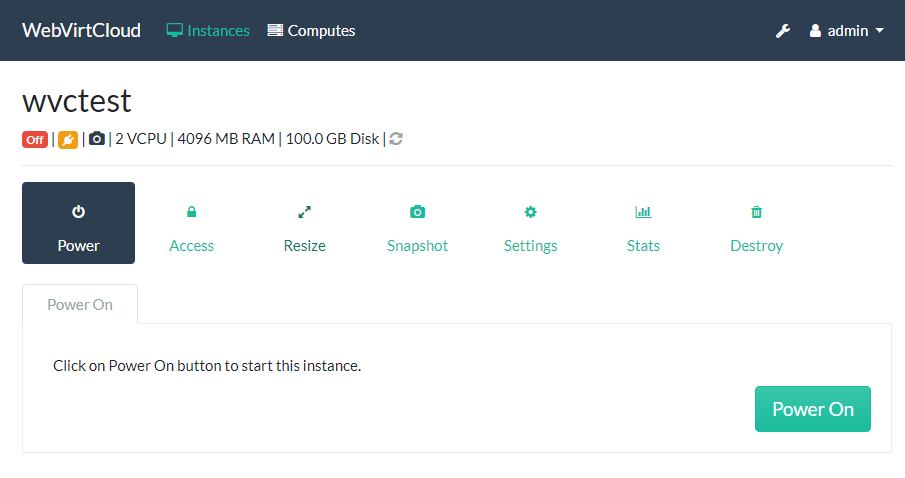 |
| Grouped Instances | Non-Grouped Instances |
|---|---|
 |
 |
| Compute Hosts | Activity Log |
|---|---|
 |
 |
Development
Run every step as your normal user, not with sudo: if manage.py ever runs as root, db.sqlite3 and data/ end up root-owned and later runs fail with "readonly database" or "Permission denied".
-
System packages. The virtualenv reuses the distro's
libvirt,lxmlandldapbindings when their versions satisfyconf/requirements.txt; otherwise pip installs or builds newer ones:# Rocky Linux / RHEL / Fedora sudo dnf -y install git python3-devel libvirt-devel python3-libvirt python3-lxml python3-ldap gcc # Ubuntu / Debian sudo apt-get update && sudo apt-get -y install git python3-venv python3-dev python3-lxml python3-libvirt python3-ldap libvirt-dev zlib1g-dev libldap2-dev libsasl2-dev gcc pkg-config # openSUSE Leap 15.x / Tumbleweed / SLES 15 (use python3.11 instead of python3 below) sudo zypper --non-interactive install -y git hostname python311 python311-devel python311-pip python311-libvirt-python python311-lxml python311-ldap libvirt-devel cyrus-sasl-devel libopenssl-devel gcc pkg-config -
Virtualenv and dependencies (
--system-site-packagesis required to see the distro bindings;dev/requirements.txtincludesconf/requirements.txt):python3 -m venv --system-site-packages .venv source .venv/bin/activate pip install -r dev/requirements.txt -
Settings and secret key:
cp webvirtcloud/settings.py.template webvirtcloud/settings.py mkdir -p data && python conf/runit/secret_generator.py > data/secret_key && chmod 600 data/secret_key -
Migrate and run the dev server (
settings-devenablesDEBUGand the Django Debug Toolbar); the admin password is indata/admin_password, or setADMIN_PASSWORDbeforehand:python manage.py migrate python manage.py runserver 0.0.0.0:8000 --settings=webvirtcloud.settings-devOpen
http://127.0.0.1:8000. For the browser console, runpython console/novncd(port 6080) in a separate terminal.
Running tests
python manage.py test   # all tests, including vrtManager
ruff check .
The suite includes mocked regression tests and disk/clone tests on libvirt's in-process test:///default driver. Set WEBVIRTCLOUD_DB_HOST (and the other WEBVIRTCLOUD_DB_* variables) to run it against PostgreSQL, as CI does.
The compute tests try a local libvirt and skip when none answers; the instance tests run only when TEST_LIBVIRT_HOST is set. A green result with skips does not establish live KVM compatibility. The instance tests create wvc-test-* VMs and a temporary wvc-test pool (/var/lib/libvirt/wvc-test), remove them afterwards, and fail if any other VM or volume on the host changed:
export TEST_LIBVIRT_HOST=compute1 TEST_LIBVIRT_TYPE=2   # 1 TCP, 2 SSH, 3 TLS, 4 socket
export TEST_LIBVIRT_LOGIN=root TEST_LIBVIRT_PASSWORD=   # login/password for TCP and TLS
export TEST_LIBVIRT_GUEST_IMAGE=/var/lib/libvirt/images/linux.qcow2   # optional, see below
python manage.py test
TEST_LIBVIRT_GUEST_IMAGE enables the tests that need a guest OS (disk and NIC hot-unplug, vCPU hotplug, guest agent, ACPI power off). It must be an installed, BIOS-bootable Linux qcow2 image with qemu-guest-agent, in a storage pool of the host other than wvc-test; the tests boot copies of it from overlays and only read the image. Shut down any VM using it first.
License
WebVirtCloud is licensed under the Apache Licence, Version 2.0.